It Fell From the Sky. We Just Shipped It.
The Alien Lights App is the pinnacle of what's possible on a phone in 2026, full stop. We threw every performance technique that exists at this thing, simultaneously, on purpose: a persistent WebSocket so input lands the instant you touch it, parallel async requests so nothing ever waits in line, end-to-end encryption on every single command, local caching so your lights answer before your phone even finishes reconnecting to WiFi, a real native UI, and a real-time audio DSP engine that listens to the room. No AI. No neural net. Pure math, running fast enough to feel alive. There is nothing left on the table. We used it all, at once, and it still runs like it's doing nothing.
We're not going to pretend we know exactly how it turned out this good. Some engineers just get lucky. Some engineers, allegedly, get help from somewhere else entirely.
"OMG. THIS IS THE APP WE'VE BEEN WAITING FOR.
WHERE HAS THIS BEEN THE LAST 10 YEARS?"
— every single person who has ever opened it
Every Trick In Existence. Used At Once.
This isn't marketing shorthand. This is the actual list.
Persistent WebSockets
Parallel Async Everything
End-to-End Encryption
Local Caching, Instant Response
Offline-First Architecture
Real-Time Audio DSP (HotKey Genie)
Real Native UI
Galaxy Multi-Device Sync
Instant Palette & HotKey Sharing
Works Fully Offline
Self-Healing Connections
Automatic Device Discovery
Smooth, Never-Stutters UI
Cryptographic Ownership, Not Passwords
Every Rig, One Device List
New Tap Always Wins — No Queue Backup
This Is the Tip of the Iceberg
An app this fast is already a lot. But the app is just the surface. Underneath it are two platforms doing the actual heavy lifting, and together they're the reason this thing can do what it does: control your lights from anywhere on the internet, sync every mod you build across every device you own the instant you build it, and hand control to a friend and take it back a second later. This is the part that makes people say OMFG.
Galaxy: Control From Anywhere on Earth
The app isn't tied to your home WiFi. Galaxy finds your devices wherever they are and connects direct, millisecond latency, no cloud roundtrip — from your couch, from a café, from another continent. Can't connect direct? Encrypted relay failover kicks in automatically. You never notice.
The killer part: hand a friend secure, temporary access to your rig for the night, then revoke it instantly the second the party's over. They connect straight to your device. Not through us.
See how Galaxy works
Nexus: Every Mod, Synced Everywhere, Instantly
Every HotKey, palette, and effect you build in the app is cryptographically yours — not stored on our servers, not locked to our app. Nexus syncs it to your phone, your tablet, your watch, in real time, end-to-end encrypted, even before you knew you'd need it there.
The killer part: because your mods are 100% portable, you can hand a whole HotKey pack or an entire show straight to someone else's app. Device to device. No cloud upload. No account merge. No waiting on anyone's permission.
See how Nexus works
Every Screen You'll Actually Use
Real screenshots. Real app. Nothing staged. This is what the pinnacle of lighting control actually looks like.
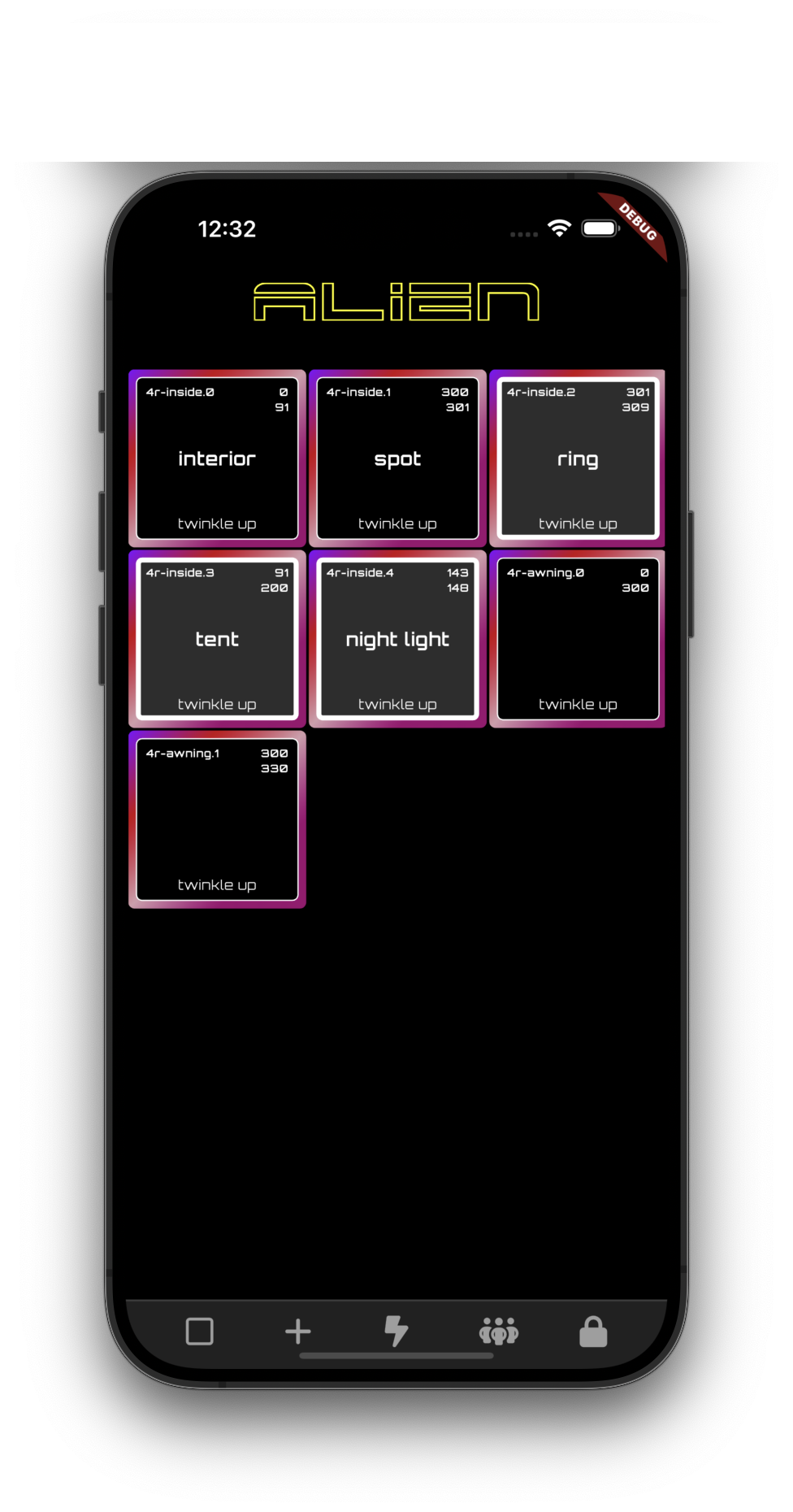
Every Zone. One Tap. No Excuses.
Every light, every room, every rig you own, on one screen. Rename zones, group them, command your entire universe of lights without ever hunting for the right toggle.
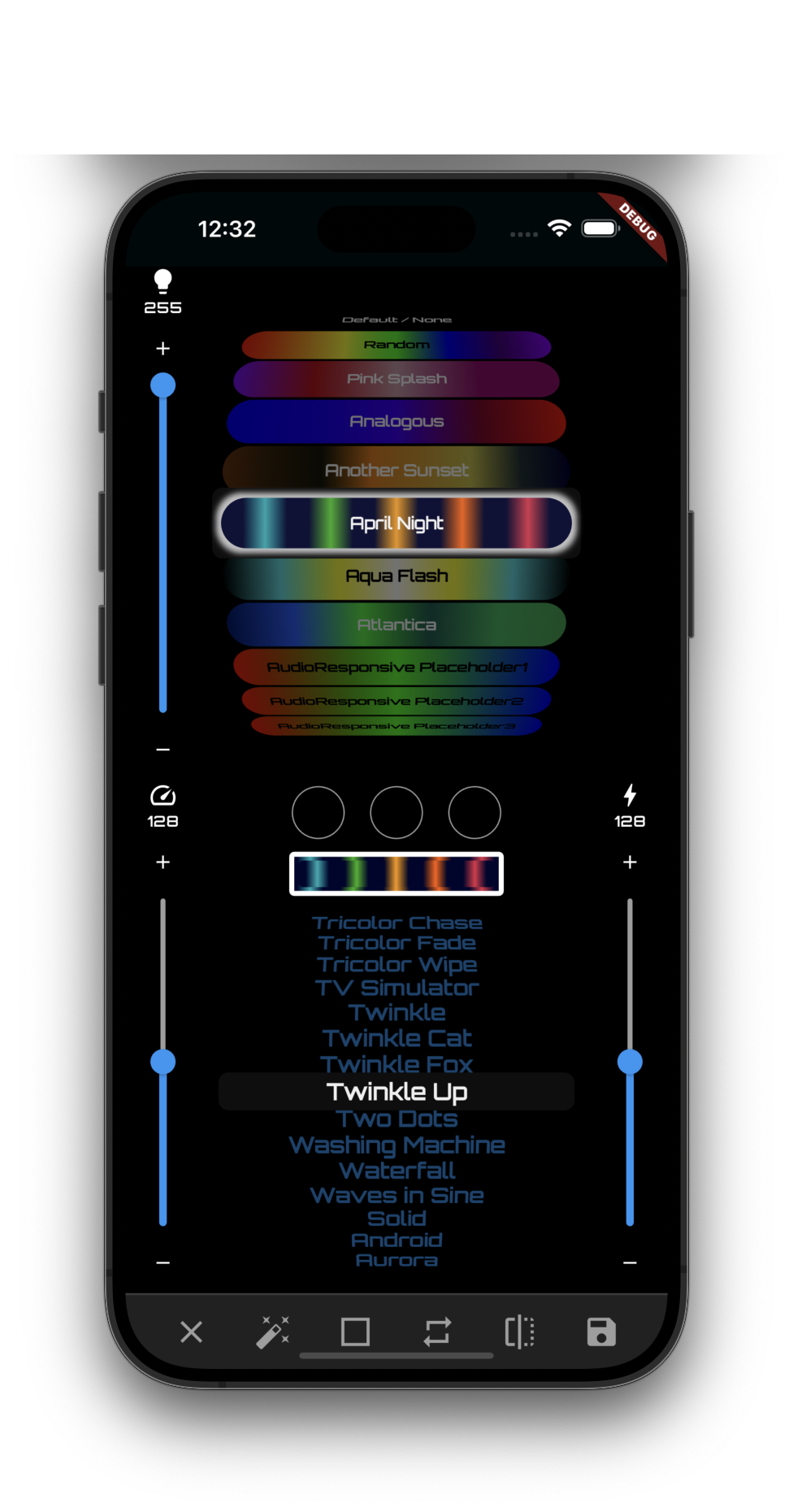
Hundreds of Effects. Zero Lag. Actually Zero.
Scroll the entire effects library and watch every change land before you finish the tap. No spinner. No "saving…" toast. No begging a server for permission. The WebSocket doesn't wait — it just happens.
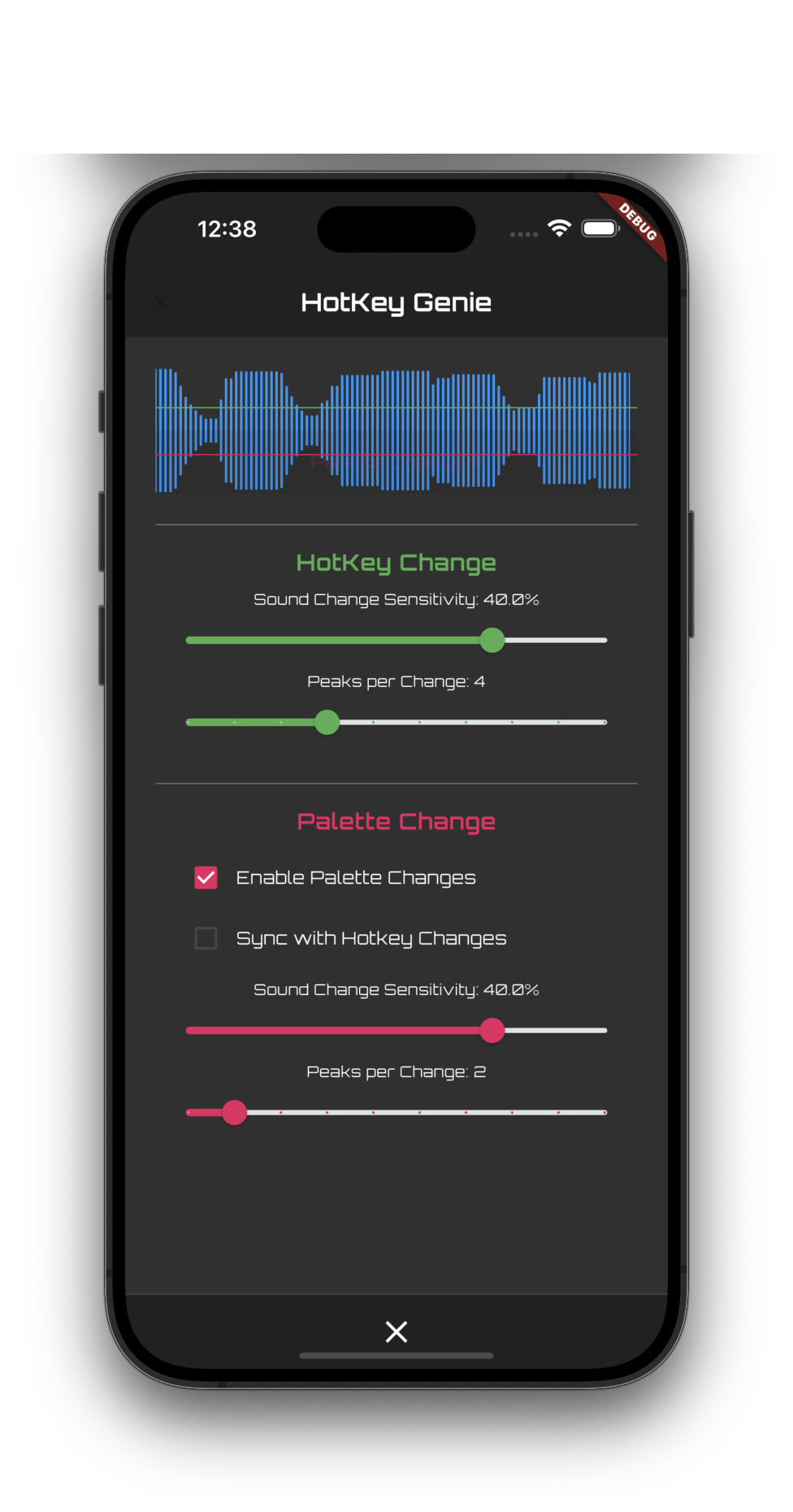
HotKey Genie: Lights That Listen
This is the one that breaks people's brains, every time. No AI, no neural net, no cloud call — just real-time waveform math running fast enough to fire hotkey and palette changes on the beat, live. Tune the sensitivity, tune the peaks, then put your phone down and watch your lights run themselves. Nobody else has this. Nobody.
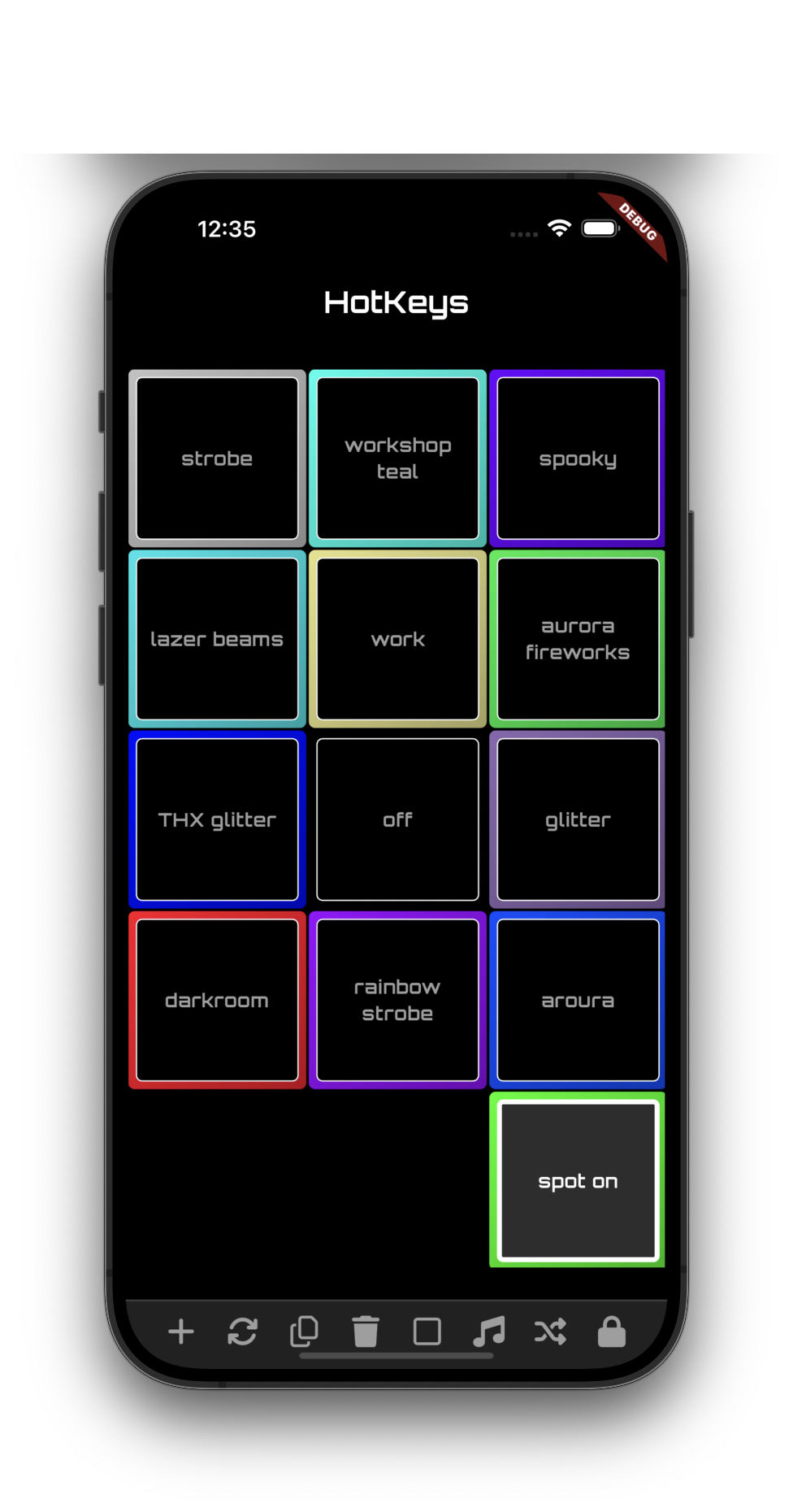
Your Whole Show. One Tap Away. Every Time.
Save any combination of zones, effects, and colors as a HotKey. Rename them, reorder them, edit them in place. "Darkroom," "THX glitter," "spot on" — your entire production is one tap away, forever.
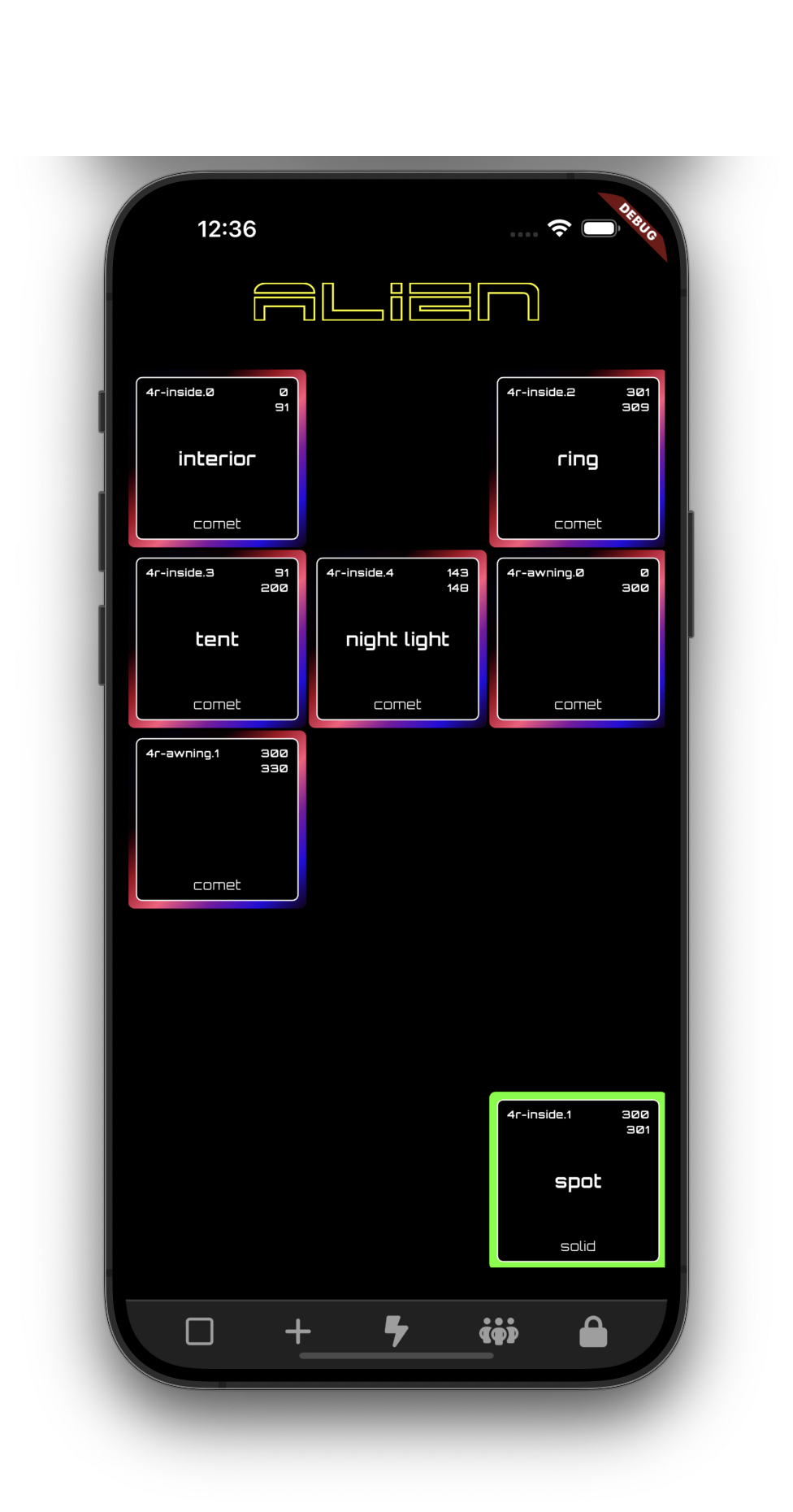
Live Effects, Every Zone, At Once
Group zones into segments on the fly, then watch a single effect run live across every one of them, perfectly in sync.
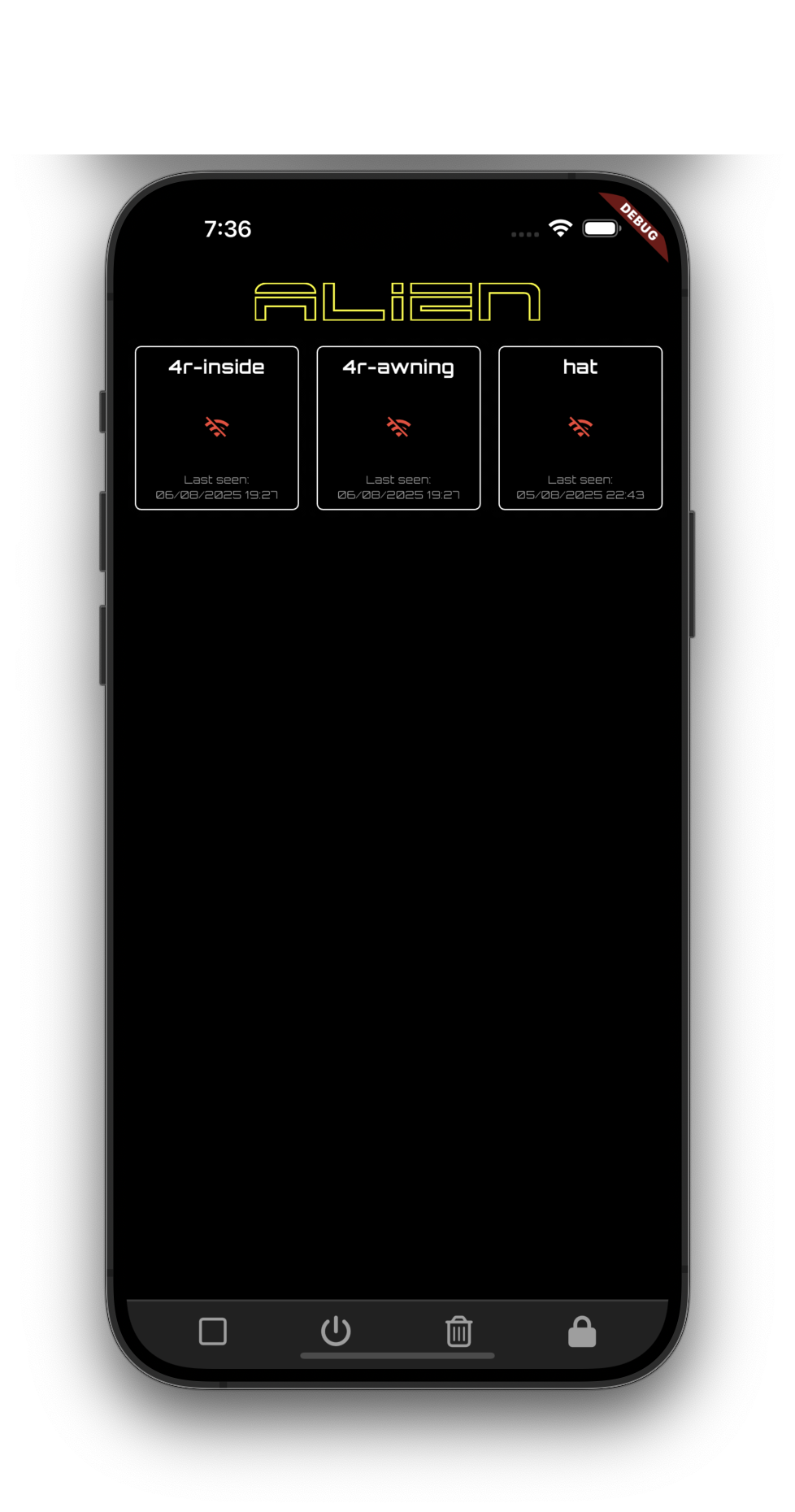
Command Your Entire Fleet From One Screen
Every rig you own — inside, awning, hat, whatever you've built — from a single device list. Add a controller and it just appears. No re-pairing. No re-downloading. No drama. This is what "it just works" is supposed to feel like.
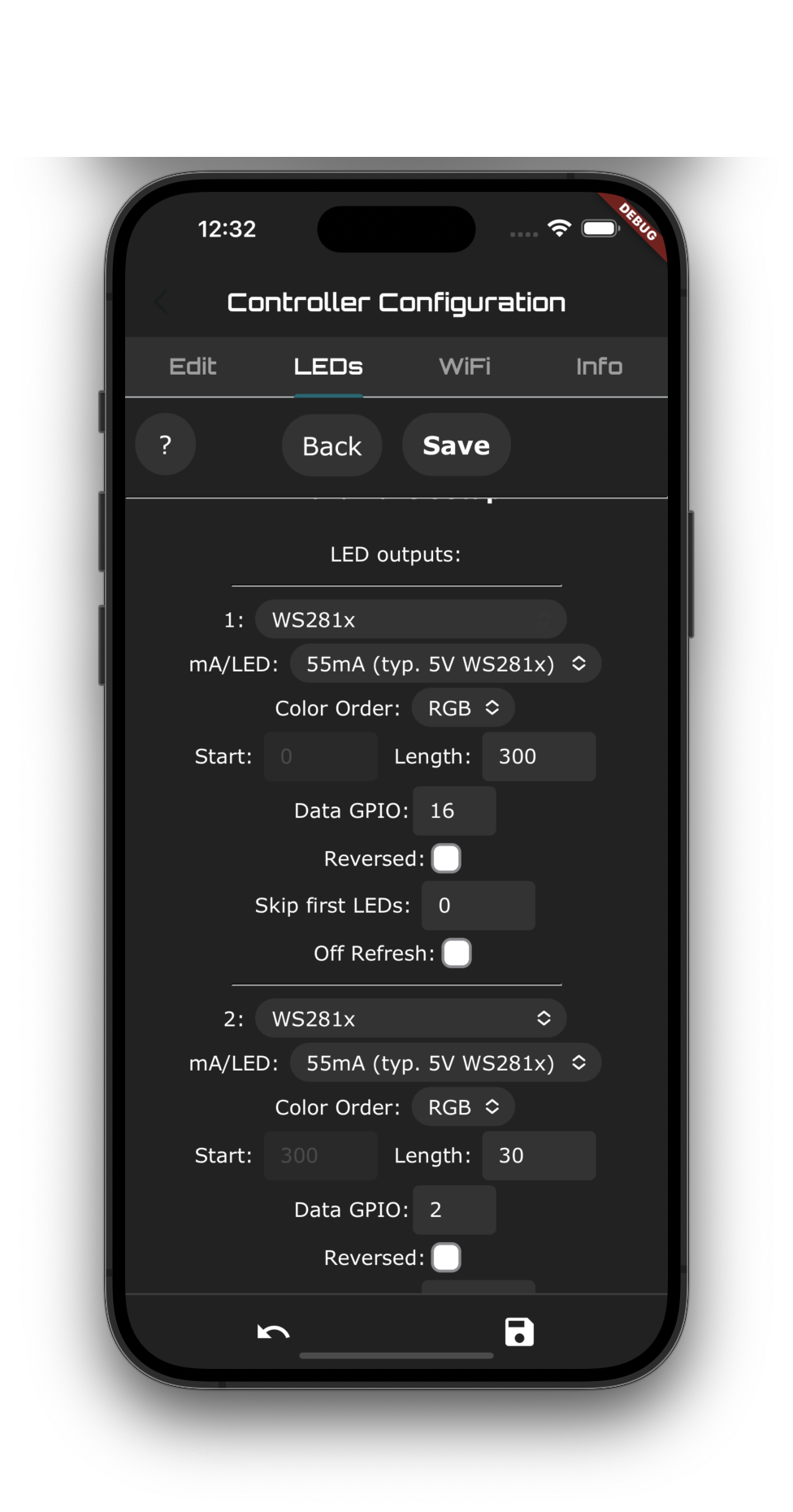
Pro Mode: As Deep As You Dare
Full LED protocol config. GPIO pin assignment. Per-output current draw. WiFi setup. The same raw power you'd get flashing firmware by hand from a terminal — except it's a phone app, and you never left it.
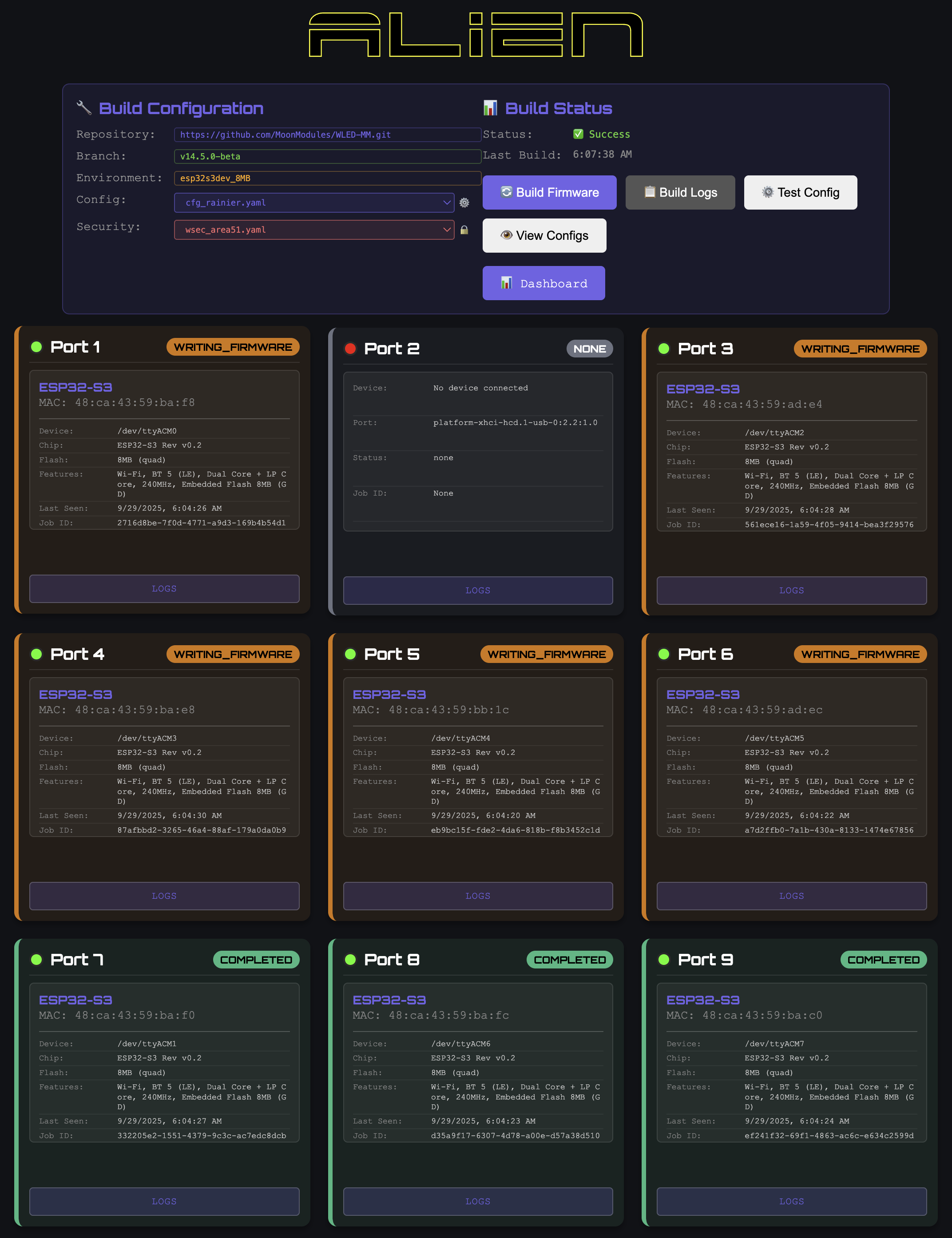
Built on a Real Pipeline, Not a Garage Project
Every controller that ships is built and validated on a real, monitored firmware pipeline: live build status, per-port flashing, cryptographic signing — all before a single unit reaches you.
What's Actually Inside
No hand-waving. This is the real list.
The Alien Lights App
- Real native UI
- Persistent WebSocket connection, input lands instantly
- Parallel async requests, nothing blocks on anything else
- End-to-end encrypted, every single command
- Local caching — lights respond even mid-reconnect
- Sound-reactive HotKey Genie, built in
- Every rig you own, in one device list
- Control from anywhere on Earth via Galaxy
- Every mod synced everywhere, instantly, via Nexus
For the Engineers: The Actual Changelog
No hand-waving here either. 150 numbered, specific, shipped decisions, pulled straight from the real internal engineering log — trimmed only where something was too minor to be worth your time. Not a buzzword in the list.
Fire Path (Hotkeys)
- Ultra-fast parallel dispatch — every controller fires at once via
Stream.fromFutures, not one at a time
- Command superseding — a new tap kills whatever's still in flight for that device
- Commands are scoped with per-device IDs, so two different rigs firing at once never collide
- Cancel-all on tap — any pending commands get dropped before the next one even starts mapping
- Fire-before-emit — the network call starts before the UI's own active-state change is emitted
- Optimistic emit — local state updates before the network call even returns
- Widget-local active state — the button lights up before the state layer round-trips at all
- A dropped, superseded command is simply discarded — it's never retried after the fact
- WS-first send — persistent socket, with an automatic HTTP fallback if it's not open
- 3× parallel HTTP retries, 5ms stagger, first success wins
- Retry-supersede checks — every retry aborts itself if a newer command already exists
- Minimal delta payloads — only changed fields, using WLED's short keys (
fx, sx, ix, pal, col...)
- Brightness always sends with a cue, even if brightness itself didn't change — the cue stays authoritative
- Flash suppression — WLED doesn't write to flash memory on every single cue, protecting the hardware
- Fire-and-forget persistence — the disk write never sits on the critical path
- HotKey Genie has a built-in cooldown, with separate sensitivity for hotkeys vs. palettes
- Hotkey and palette sensitivity in HotKey Genie can be tuned completely independently of each other
- Every fire-path decision was made for one reason: nothing should ever feel like it's waiting on the network
Sharing & Palettes
- QR codes for sharing are pre-generated and cached, not built on demand
- QR regeneration is debounced automatically, so it never fires on every keystroke
- QR encoding runs in its own isolate — it never blocks the UI thread
- Ultra-compact QR schema — single-character keys, hex colors, nothing wasted
- QR palette exports use the same single-letter key schema as hotkey QRs, not a separate format
- Virtual palette IDs route favorites and randomizers without ever touching real palette storage
- Custom palettes save locally first, sync second
- Custom palettes keep their local copy if a device fails to load — never silently lost
- Favorites live in their own separate storage key from the palettes themselves
- Parallel device × palette sync — every device, every palette, at once
- Slots sync to every device in parallel, but slots on the same device go one at a time — no flooding a single controller
- Slot reassignment is dense and deduplicated — no gaps, no wasted slots
- Palette syncs dedupe by provider ID automatically
- A palette-change broadcast stream lets pickers subscribe instead of re-rendering everything
- Pinned palettes get their own stream too, so pinning or unpinning never triggers a full picker rebuild
- Every slot is verified and content-compared automatically after a sync, not just assumed to have landed
- A slot that fails verification gets retried automatically before anything is ever reported as failed
- Color harmony is computed entirely on-device — zero network calls
- Harmony button samples are pre-cached so the picker opens instantly
- Icon names are cached, so the icon picker never recomputes them on every render
- Icon wheel children are cached the same way, for the same reason
- Effect-to-icon keyword matching is cached once instead of re-matched every time an effect renders
- Icon deck shuffling skips consecutive duplicates automatically, same as the effects shuffle
- Playlists never repeat a hotkey until the whole list has played
- Custom palette candidates wait automatically for local storage to finish loading before appearing — no half-loaded lists
- QR imports verify offline via Ed25519 signatures against a local key registry
- Signing-key sync ships only revocation deltas, never the whole registry
- A device that fails to load its custom palette keeps showing the last known good version instead of an empty list
- Palette favorites and pinned palettes are tracked as entirely separate concerns, so toggling one never touches the other
- Random and favorite palette selection route through the same virtual-ID system, so they never collide with a real saved palette
- Sharing a full HotKey pack and sharing a single palette use the same underlying QR pipeline, just different payloads
- Every QR payload is size-checked before generation, so it never silently produces a code too dense to scan
- Nothing about sharing a palette or a HotKey ever requires an account, a login, or a network connection
Offline-First
- Every piece of state — devices, hotkeys, settings, WiFi, factory data, auth — persists locally by default
- Storage has a timeout with an in-memory fallback, so the app still boots if disk hangs
- Effect and palette catalogs ship bundled in the binary — zero network required to browse them
- WLED presets resolve from a static local lookup, not a live request
- Full state backups happen with no server involved
- Backups compress with BZip2 before export
- OTA passwords cache locally to support parallel multi-device flashing
- Firmware itself can be cached offline at startup
- Device config (
/json/cfg) is cached locally instead of being re-fetched every single time it's needed
- Every stored piece of state carries its own explicit key, separate from its serialized payload, so a future migration can't silently corrupt old data
- The app boots, browses effects, and edits hotkeys the same way whether you're on WiFi, on airplane mode, or standing on the open playa
Parallel Everything
- Parallel refresh across every device — each device times out independently, not the whole batch
- Pull-to-refresh triggers discovery and a full refresh together, timed so discovery has room to actually finish
- Parallel LAN probing, so one slow device never holds up the rest
- Subnet scans batch 30 addresses at a time, TCP pre-checked before a full probe
- Segment updates run in parallel across every device
- Segment posts run in parallel too, independent of the updates
- Segment refreshes are their own parallel batch, scaled to 500+ devices at once
- Flashing multiple controllers happens in parallel, not one at a time
- Claiming multiple devices happens in parallel too
- WebSocket reconnects across devices run in parallel after a network drop
- Relay discovery and Galaxy provisioning both run in parallel with everything else, never blocking the queue behind them
- Two-phase network sync — prepare, 5ms stagger, then execute, with a 20ms auto-return
- Segment wizard initialization runs in parallel, not step by step
- Effect-widget palette saves run in parallel with each other too
eagerError: false — one dead device never cancels the rest of the batch
Devices & Segments
- Delta-only device payloads — only what actually changed since the last state, per device
- A brightness-only path skips the full segment payload entirely when that's all that changed
- Segment merges are smart — selection, groups, order, and position all survive a refresh
- O(1) lookup maps for group→segment and device→MAC, not linear scans
- Deep-copies only touch the fields that actually changed
- Response times are tracked in a rolling buffer, not an unbounded log
- Signal strength gets its own rolling buffer too
- WebSocket round-trip times are tracked the same way, capped instead of growing forever
- Device identity is keyed to a stable MAC address, not a name or IP that can change
- Segments repair themselves automatically on startup
- Grid positions initialize lazily, so the UI never blocks waiting on layout
- The segment wizard caches each device's original values before you start editing, so canceling an edit costs nothing
- A segment can resolve back to its parent device by MAC address even if the segment's own UUID changes
Network & Resilience
- One persistent WebSocket per device, identified by MAC address, HTTP as fallback, reconnecting after a successful HTTP call
- A connecting guard prevents duplicate handshakes to the same device
- Devices that don't support WebSockets are skipped automatically, no wasted attempts
- WebSocket handshakes time out automatically if a device doesn't respond
- A lightweight
{"v":true} ping measures latency and signal strength — no full state pull needed
- Slow replies are treated as broadcasts, not direct responses
- Only the first response to a command counts — duplicates get ignored automatically
- Every kind of network call — hotkeys, probes, refreshes — has its own independently tunable timeout budget
- Timeout logging stays quiet by default — no noisy logs during normal retries
- Network connections are pooled and reused, with failed ones evicted automatically
- A circuit breaker stops retrying a device after 3 sync failures in a row
- Connection order is always LAN-first, then NAT-punch, then tunnel — never the reverse
- The Galaxy tunnel connects without blocking the UI while it's negotiating
- Once the tunnel is ready, traffic routes to a local address instantly — no renegotiation mid-session
- A tunnel connection is never trusted blindly — it's live-probed before anything routes through it
- Local network state syncs directly over UDP, on its own dedicated port, alongside discovery
- The relay is built for high concurrency, so one busy connection never blocks another
- Devices get an automatic grace window before being marked offline — no flapping on a flaky WiFi hiccup
- The relay connection pauses automatically in the background and reconnects the instant the app resumes
- A device marked offline gets re-probed automatically instead of just waiting to be manually refreshed
- Every retry, at every layer, checks first whether a newer command has already superseded it
- Network errors are categorized, so a timeout, a refusal, and a malformed response are never handled identically
- Nothing in the network layer assumes the internet exists — every path has a local-only route
- The app never opens more simultaneous connections to a single device than that device can actually handle
- Every network path — direct, relay, or tunnel — is encrypted end-to-end, so which path won never changes what's exposed
Discovery
- A discovery guard means mDNS/Bonsoir never runs two scans at once
- Discovery uses the native mechanism per platform — Bonsoir on iOS, mDNS directly on Android
- Discovery status is exposed as a stream, so spinners never rely on polling
- A duplicate discovery request automatically re-runs itself instead of stacking up parallel scans
- Background discovery kicks in right after the very first frame renders — the UI never waits on it
- Live-preview state pushes over the WebSocket — no polling needed to keep it current
- Discovery works the same whether you're on your home WiFi or a completely offline local network
- A device found by discovery is matched against existing devices by MAC, never accidentally duplicated
- Discovery never depends on a server or push notification — it's peer-to-peer by design
- A device that goes quiet gets re-probed automatically, on its own schedule, before it's ever marked unreachable
Performance & UI
- Change notifications are diff-only — just online devices, just changed fields
- Random palettes resolve once per fire, not once per frame
- Shuffle decks for random effects never repeat a pick back-to-back
- The color wheel uses a
ValueNotifier — rotating it never rebuilds the whole widget tree
AutomaticKeepAlive on the Hotkey/Segment/Device views — switching tabs costs nothing- Each main view remembers its own scroll position independently of the others
- Page widgets are cached after their first build, not reconstructed every time you switch tabs
- Settings tabs use an instant-switch layout — no rebuild cost for moving between them
- The free-position grid caches layout and pauses recalculation mid-drag
- Every grid item carries a stable key, so drag-reordering never confuses one item for another
- A locked grid makes reordering a no-op — your layout stays exactly where you put it
- Grid positions on hotkeys and segments persist, so your layout survives every refresh
- Static painters return
shouldRepaint => false — nothing repaints unless something actually changed
- Sorted effects list is cached once, not re-sorted on every build
- The hotkey grid adapts its column count (3–7) to the screen it's on
- Flash progress streams live, so you watch a flash happen instead of waiting on a spinner
- Performance graphs cap at a fixed number of points, so a long session never balloons memory
- The live performance view only runs its refresh timer while you're actually looking at it
- Restore dialogs show lightweight placeholder hotkeys instead of loading everything up front
- Restore lists use fixed, non-scrolling layouts, so nothing jitters mid-restore
- Hotkey card flash and rotation animations run on their own timers, completely decoupled from the network layer
- Desktop builds get drag-to-reorder tuned separately from touch, instead of one input model pretending to fit both
- Nothing on screen ever waits for a widget rebuild just to reflect a state that already changed
- Every list in the app that can grow unbounded has a cap, on purpose, so memory use stays flat over a long session
- If a screen isn't visible, nothing on it is still doing work in the background
Steal any of this. Copy every line into your own app, for a completely different product — we mean it, genuinely. It won't matter. The tricks were never the moat. The brand, the timing, and being the app people are already using when the gate opens at Burning Man 2026 — that's the part nobody gets to copy.
Or dig into Galaxy (control from anywhere) and Nexus (your mods, synced and owned) — the two platforms actually doing the work.
