The product app · Android · iOS · desktop · v1.0.37

LIGHTS APP

Every light, the instant you touch it.

The product app for the lights. Builds ship for Android, iOS, macOS, Windows, and Linux from the same CDN release, with the Android SHA-256 beside the buttons.

  • Zones
  • Effects
  • HotKeys
  • HotKey Genie

Android 8+, iOS 15+, macOS 12+, Windows 10+, Linux x64. 0 downloads

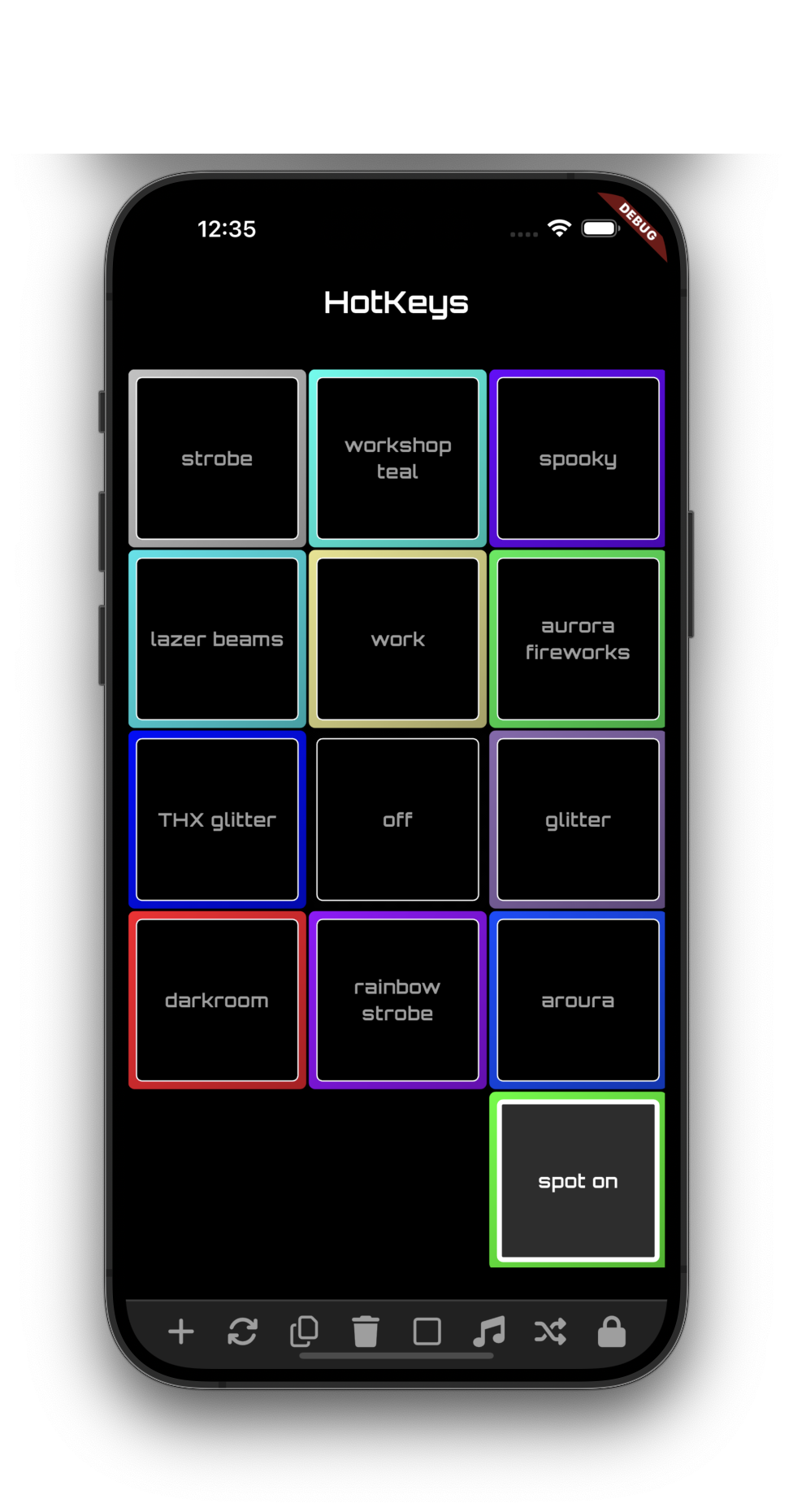
HotKeys grid with named scenes
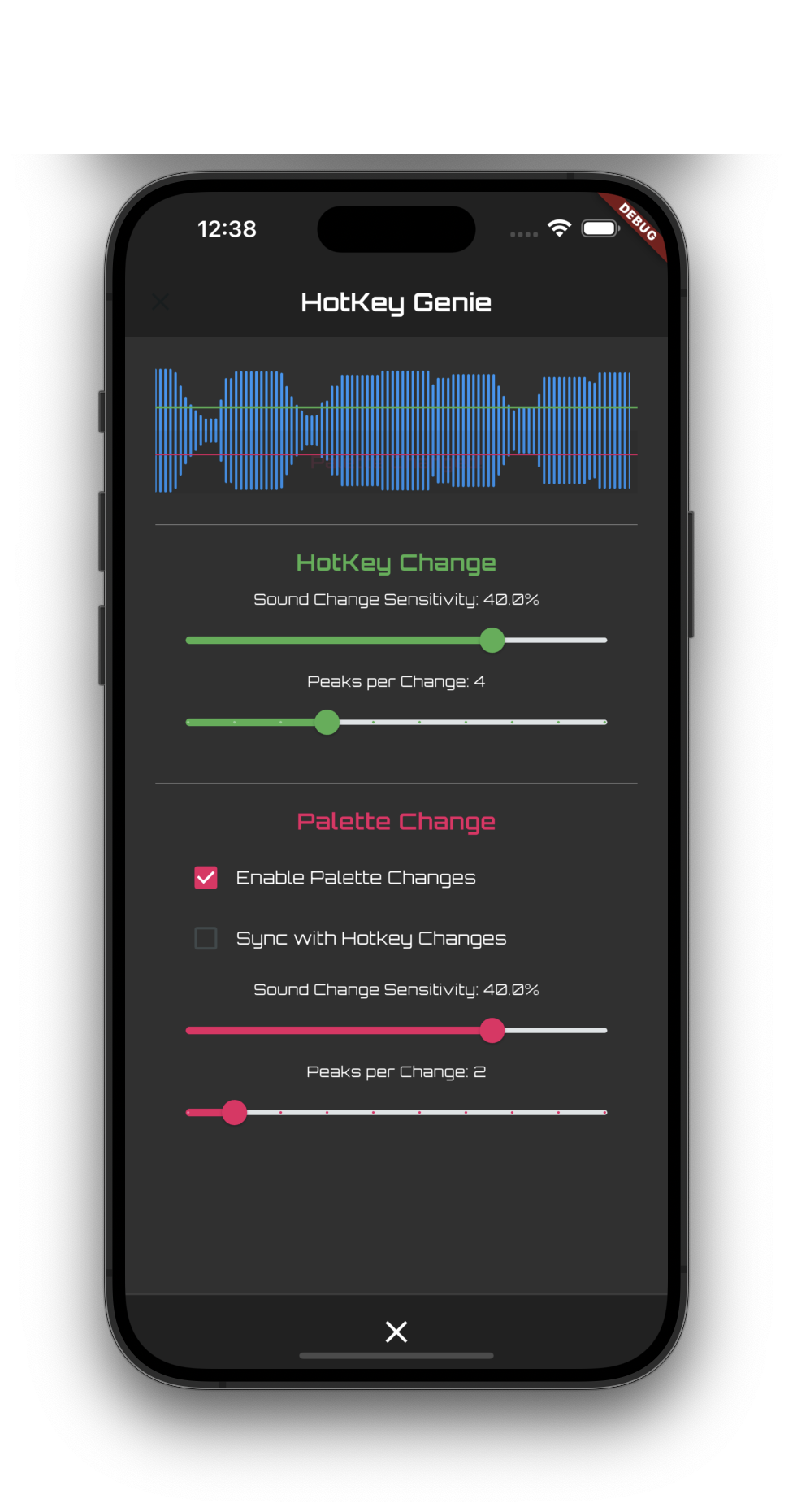
HotKey Genie waveform and sensitivity sliders
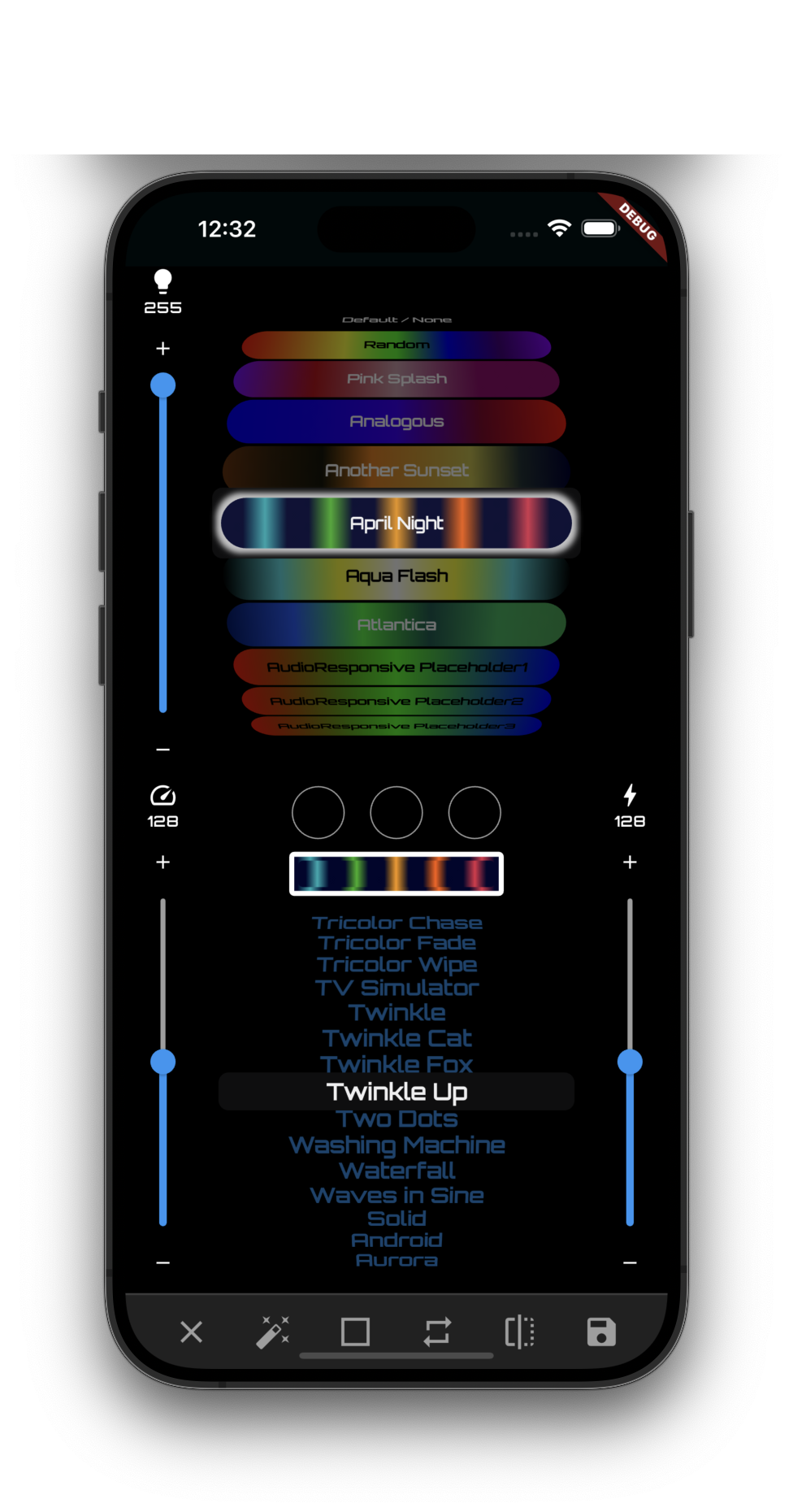
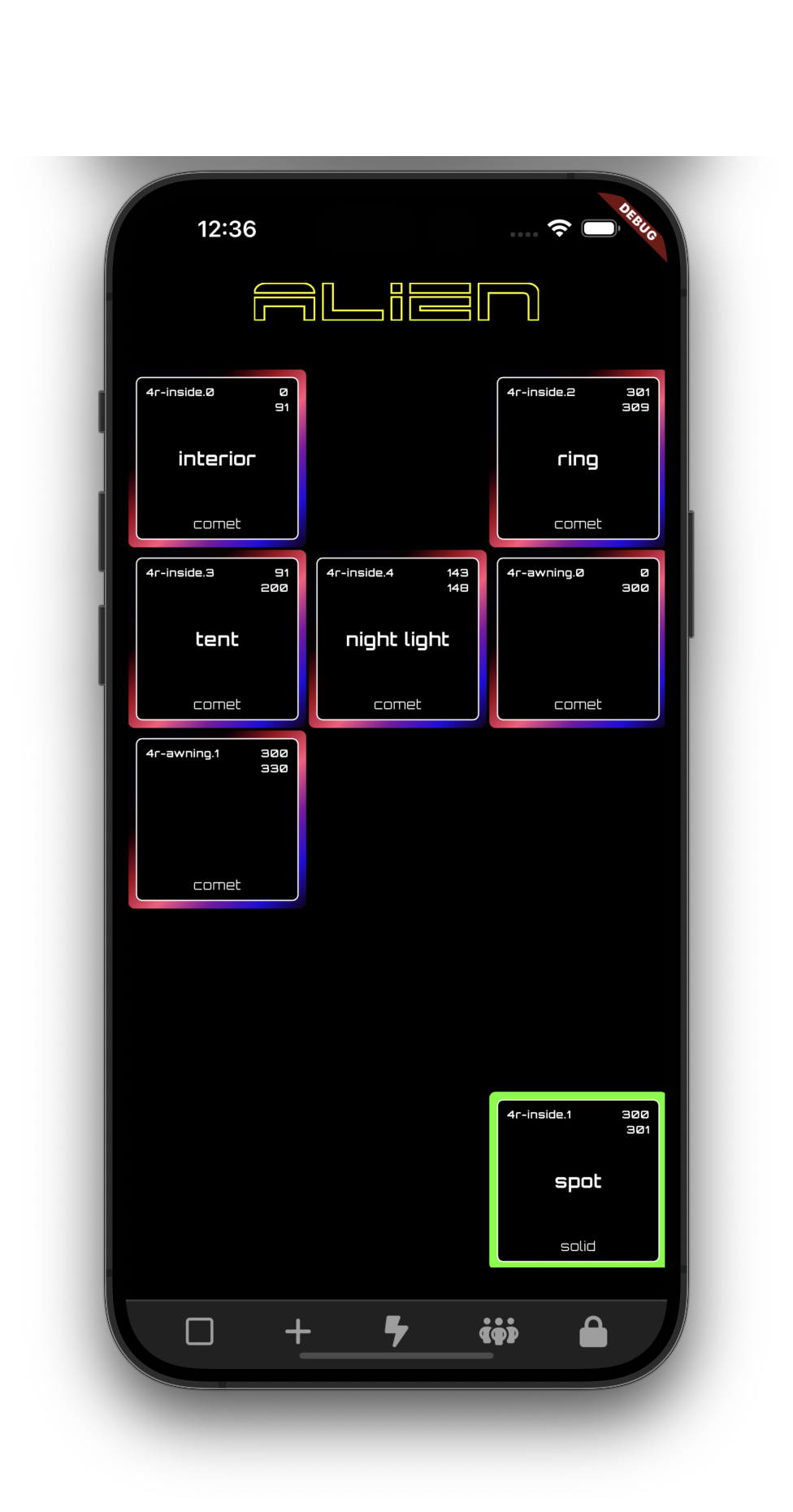
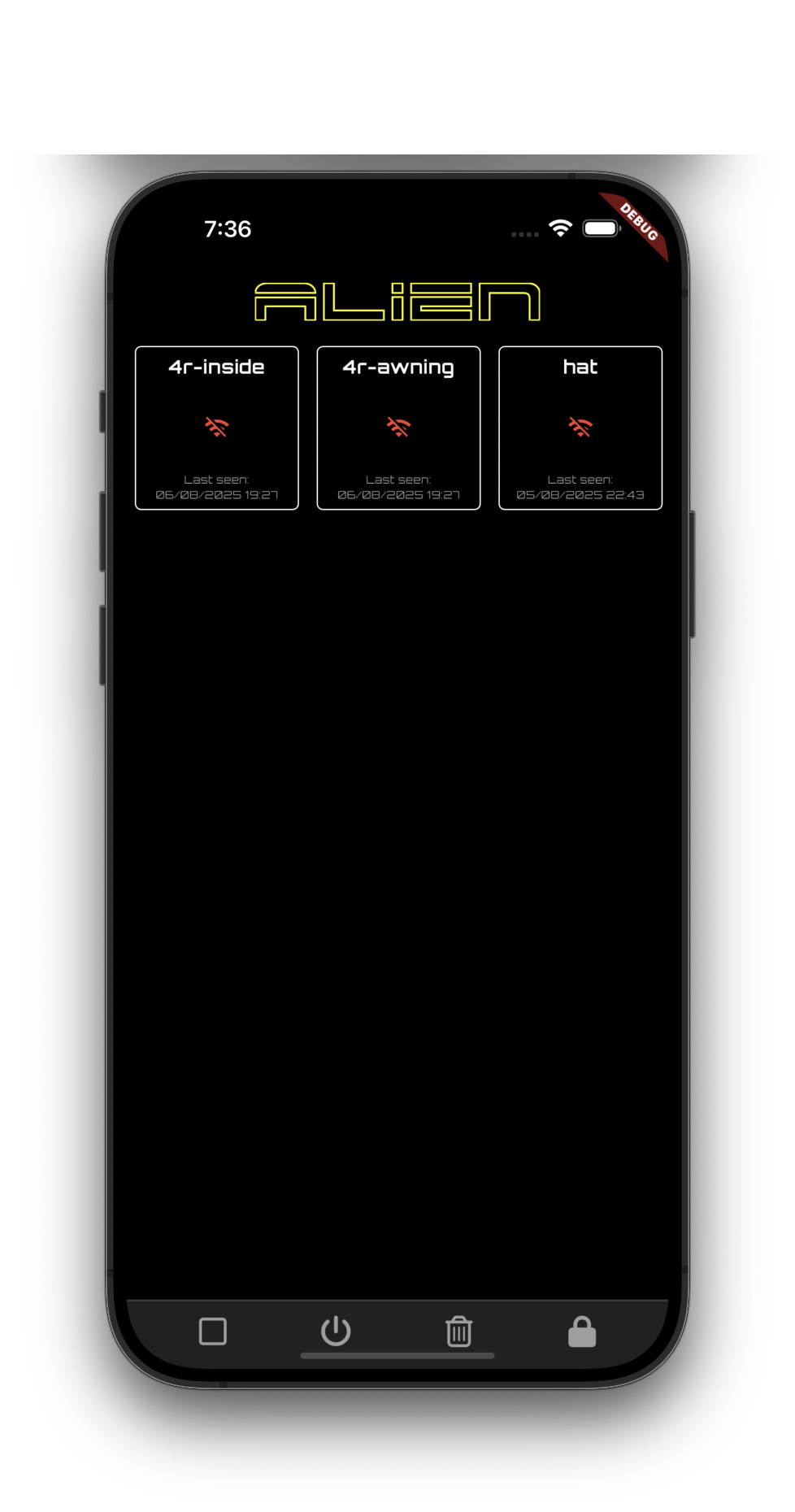
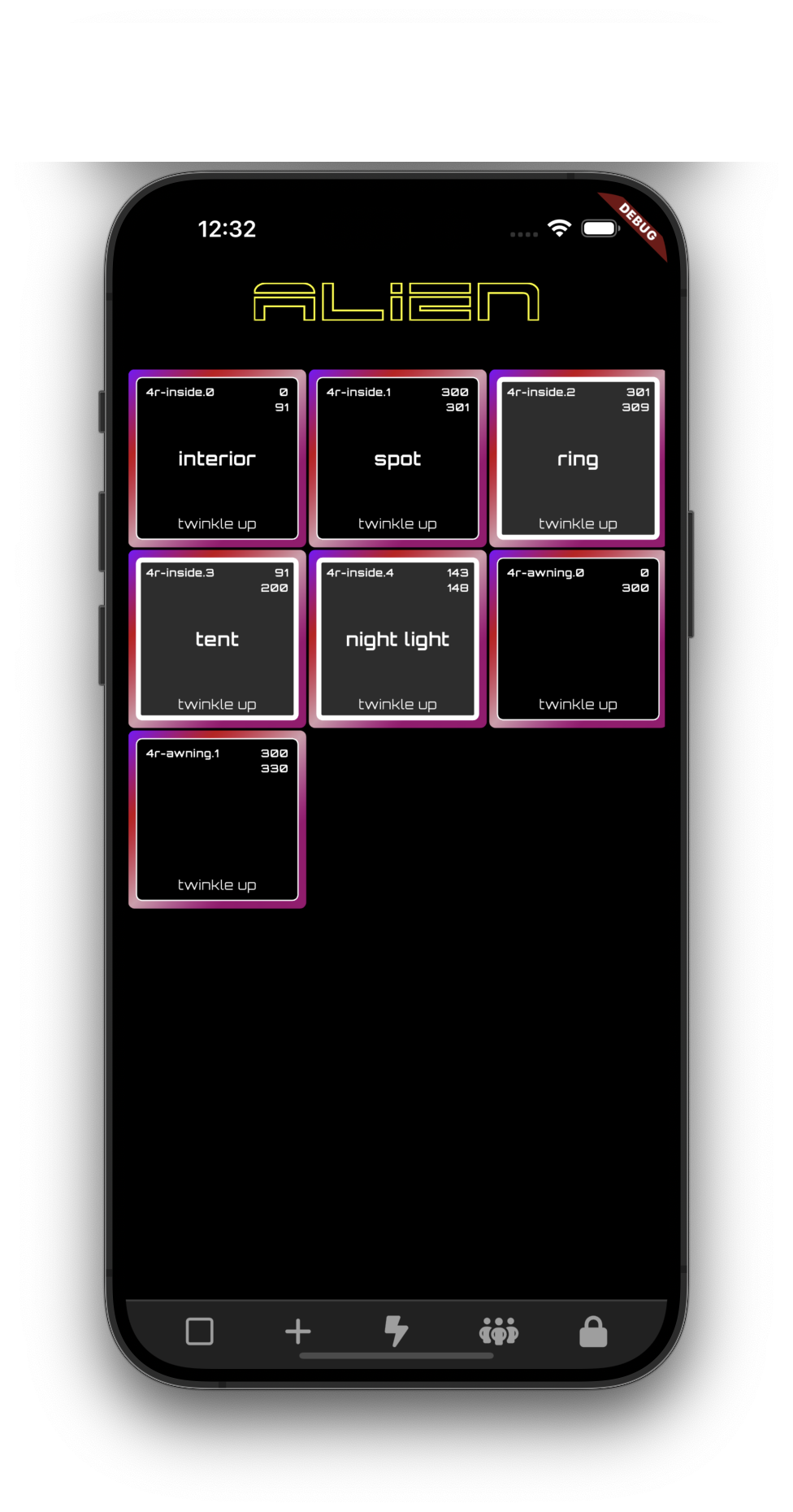
Zones dashboard with interior, spot, ring, tent, and night light Effects and palette picker Zones with a live effect running Device switcher with named rigs
Tap lands instantly WebSocket open Works offline Lights that listen
Live

Downloads around the world

Live count by origin country. Alien Lights downloads are each connected to the Cloudflare edge that actually served them. Refreshes as new installs land.

Top countries
    Top Cloudflare edges

      Alien Lights download origin (country) Cloudflare edge that served it

      Aggregated by country and edge only — never by IP, city, or individual visitor.

      OMG. THIS IS THE APP WE'VE BEEN WAITING FOR.
      WHERE HAS THIS BEEN THE LAST 10 YEARS?

      every single person who has ever opened it
      The product

      It fell from the sky. We just shipped it.

      The Alien Lights App is the pinnacle of what's possible on a phone in 2026, full stop. We threw every performance technique that exists at this thing, simultaneously, on purpose: a persistent WebSocket so input lands the instant you touch it, parallel async requests so nothing ever waits in line, end-to-end encryption on every single command, local caching so your lights answer before your phone even finishes reconnecting to WiFi, a real native UI, and a real-time audio DSP engine that listens to the room. No AI. No neural net. Pure math, running fast enough to feel alive. There is nothing left on the table. We used it all, at once, and it still runs like it's doing nothing.

      We're not going to pretend we know exactly how it turned out this good. Some engineers just get lucky. Some engineers, allegedly, get help from somewhere else entirely.

      All at once

      Every trick in existence

      This isn't marketing shorthand. This is the actual list.

      WebSockets

      A socket stays open, so a tap does not wait on a new connection.

      Persistent

      Parallel async

      Controllers fire together. One slow device never holds the rest.

      Nothing queues

      Encrypted

      Every command is end to end encrypted, whichever path it takes.

      Every command

      Local cache

      Lights answer before the phone finishes reconnecting to WiFi.

      Instant

      Offline-first

      Effects, palettes, and hotkeys ship in the app. No network required to browse them.

      Airplane mode

      HotKey Genie

      Real-time waveform math. No neural net, no cloud call. The lights listen to the room.

      On the phone

      Native UI

      A real phone UI. The screen does not wait on a rebuild to show a change that already happened.

      Sharing

      Hand a HotKey pack or a palette to another phone by QR. No account, no upload.

      Fully offline

      Same app on home WiFi, airplane mode, or the open playa.

      Self-healing

      A dropped socket comes back. A quiet device gets probed again before it is marked gone.

      Discovery

      Controllers show up on the local network. A new one just appears. No re-pairing drama.

      Never stutters

      Lists are capped, hidden screens stop working, and painters skip a frame that did not change.

      Ownership

      Mods are cryptographic, not a password on our server. They are yours.

      One device list

      Every rig you own, from one list. Inside, awning, hat, whatever you built.

      New tap wins

      A fresh touch kills whatever is still in flight. Nothing stacks up behind you.

      The real screens

      Every screen you'll actually use

      Real screenshots. Real app. Nothing staged. Pick one.

      Alien Lights App zones dashboard showing interior, spot, ring, tent, and night light controls

      Every zone. One tap.

      Every light, every room, every rig you own, on one screen. Rename zones, group them, command your entire universe of lights without ever hunting for the right toggle.

      • One screenInterior, spot, ring, tent, night light. The names are yours.
      • On the phoneThe layout stays put. A refresh does not shuffle what you arranged.
      Alien Lights App effects and palette picker with live color sliders

      Hundreds of effects. Zero lag.

      Scroll the entire effects library and watch every change land before you finish the tap. No spinner. No "saving…" toast. No begging a server for permission. The WebSocket doesn't wait — it just happens.

      • No spinnerPalettes and effects are in the binary. Browsing them needs no network.
      • New tap winsA newer touch drops whatever command is still in flight.
      Alien Lights App HotKey Genie sound-reactive feature with waveform and sensitivity sliders

      HotKey Genie. Lights that listen.

      This is the one that breaks people's brains, every time. No AI, no neural net, no cloud call — just real-time waveform math running fast enough to fire hotkey and palette changes on the beat, live. Tune the sensitivity, tune the peaks, then put your phone down and watch your lights run themselves.

      • On the phoneHotkey sensitivity and palette sensitivity are separate sliders.
      • Pure mathA cooldown keeps it from firing on every peak.
      Alien Lights App HotKeys grid with named scenes like strobe, spooky, and darkroom

      Your whole show. One tap away.

      Save any combination of zones, effects, and colors as a HotKey. Rename them, reorder them, edit them in place. "Darkroom," "THX glitter," "spot on" — your entire production is one tap away, forever.

      • YoursShare a pack by QR. Nothing about that requires an account.
      • WiFiThe phone talks to the lights on the network you are already on.
      Alien Lights App zones grid with the comet effect running live across multiple zones

      Live effects, every zone, at once.

      Group zones into segments on the fly, then watch a single effect run live across every one of them, perfectly in sync.

      • In syncSegment posts go out in parallel. One dead device does not cancel the batch.
      Alien Lights App device switcher showing multiple named rigs

      The whole fleet from one screen.

      Every rig you own — inside, awning, hat, whatever you've built — from a single device list. Add a controller and it just appears. No re-pairing. No re-downloading. No drama.

      • By MACA device is the same device when its name or address changes.
      • LAN firstLocal, then a punch, then a tunnel. Never the other way around.
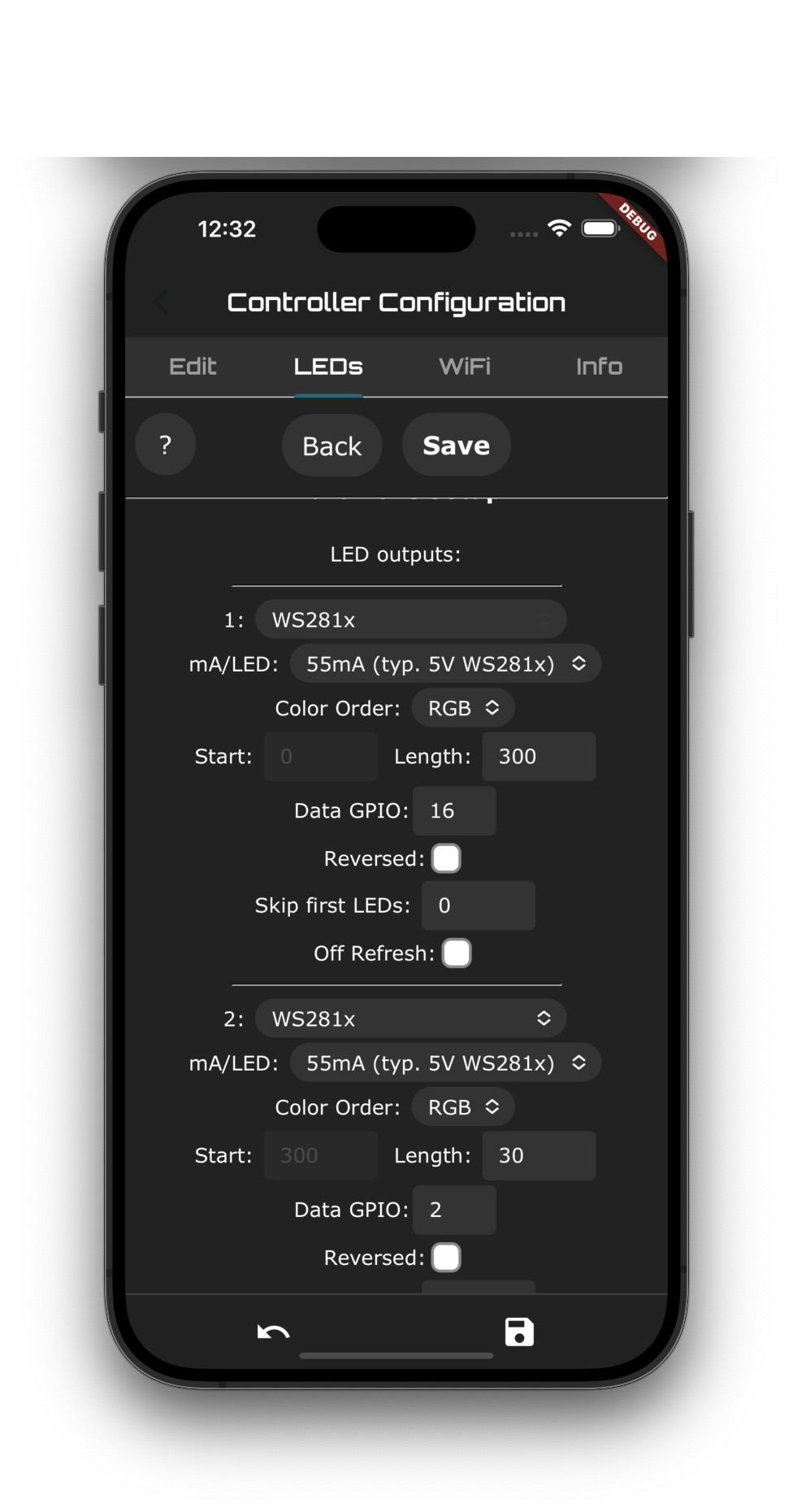
      Alien Lights App pro mode controller configuration with LED protocol and GPIO settings

      Pro mode. As deep as you dare.

      Full LED protocol config. GPIO pin assignment. Per-output current draw. WiFi setup. The same raw power you'd get flashing firmware by hand from a terminal — except it's a phone app, and you never left it.

      • In the appProtocol, pins, current, WiFi. No laptop required for the setup.
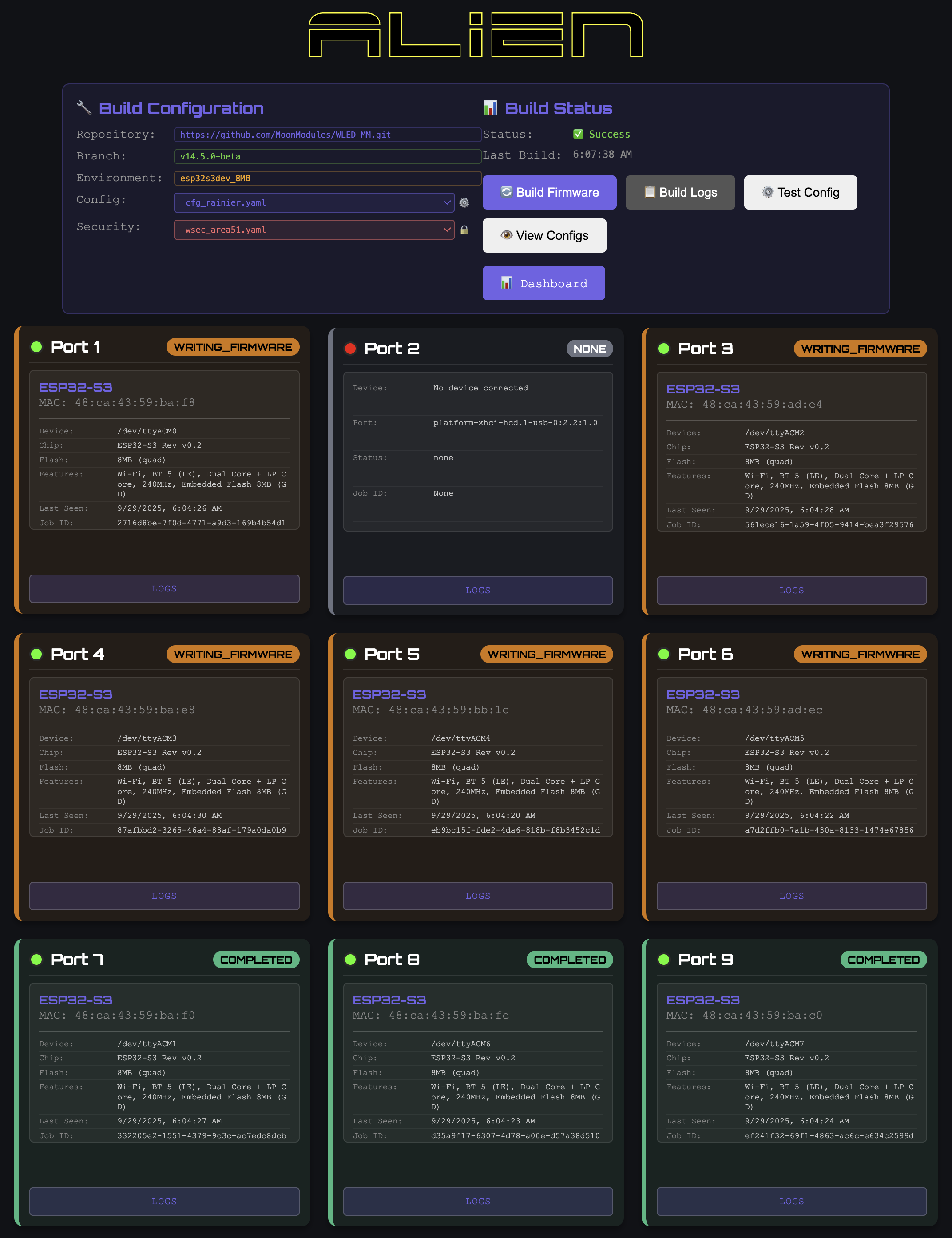
      Alien Lights firmware build pipeline dashboard showing live status across multiple controller flashing ports

      A real pipeline, not a garage project.

      Every controller that ships is built and validated on a real, monitored firmware pipeline: live build status, per-port flashing, cryptographic signing — all before a single unit reaches you.

      • SignedThe APK on this page publishes its SHA-256 so you can check the file you got.
      No hand-waving

      What's inside

      The real list, short enough to read before the engineering log.

      The Alien Lights App

      • Real native UI
      • Persistent WebSocket connection, input lands instantly
      • Parallel async requests, nothing blocks on anything else
      • End-to-end encrypted, every single command
      • Local caching — lights respond even mid-reconnect
      • Sound-reactive HotKey Genie, built in
      • Every rig you own, in one device list
      • HotKeys, palettes, and effects stay on the phone
      For the engineers

      The actual changelog

      150+ numbered, specific, shipped decisions, pulled straight from the real internal engineering log — trimmed only where something was too minor to be worth your time. Not a buzzword in the list.

      Fire Path (Hotkeys)

      1. Ultra-fast parallel dispatch — every controller fires at once via Stream.fromFutures, not one at a time
      2. Command superseding — a new tap kills whatever's still in flight for that device
      3. Commands are scoped with per-device IDs, so two different rigs firing at once never collide
      4. Cancel-all on tap — any pending commands get dropped before the next one even starts mapping
      5. Fire-before-emit — the network call starts before the UI's own active-state change is emitted
      6. Optimistic emit — local state updates before the network call even returns
      7. Widget-local active state — the button lights up before the state layer round-trips at all
      8. A dropped, superseded command is simply discarded — it's never retried after the fact
      9. WS-first send — persistent socket, with an automatic HTTP fallback if it's not open
      10. 3× parallel HTTP retries, 5ms stagger, first success wins
      11. Retry-supersede checks — every retry aborts itself if a newer command already exists
      12. Minimal delta payloads — only changed fields, using WLED's short keys (fx, sx, ix, pal, col...)
      13. Brightness always sends with a cue, even if brightness itself didn't change — the cue stays authoritative
      14. Flash suppression — WLED doesn't write to flash memory on every single cue, protecting the hardware
      15. Fire-and-forget persistence — the disk write never sits on the critical path
      16. HotKey Genie has a built-in cooldown, with separate sensitivity for hotkeys vs. palettes
      17. Hotkey and palette sensitivity in HotKey Genie can be tuned completely independently of each other
      18. Every fire-path decision was made for one reason: nothing should ever feel like it's waiting on the network

      Sharing & Palettes

      1. QR codes for sharing are pre-generated and cached, not built on demand
      2. QR regeneration is debounced automatically, so it never fires on every keystroke
      3. QR encoding runs in its own isolate — it never blocks the UI thread
      4. Ultra-compact QR schema — single-character keys, hex colors, nothing wasted
      5. QR palette exports use the same single-letter key schema as hotkey QRs, not a separate format
      6. Virtual palette IDs route favorites and randomizers without ever touching real palette storage
      7. Custom palettes save locally first, sync second
      8. Custom palettes keep their local copy if a device fails to load — never silently lost
      9. Favorites live in their own separate storage key from the palettes themselves
      10. Parallel device × palette sync — every device, every palette, at once
      11. Slots sync to every device in parallel, but slots on the same device go one at a time — no flooding a single controller
      12. Slot reassignment is dense and deduplicated — no gaps, no wasted slots
      13. Palette syncs dedupe by provider ID automatically
      14. A palette-change broadcast stream lets pickers subscribe instead of re-rendering everything
      15. Pinned palettes get their own stream too, so pinning or unpinning never triggers a full picker rebuild
      16. Every slot is verified and content-compared automatically after a sync, not just assumed to have landed
      17. A slot that fails verification gets retried automatically before anything is ever reported as failed
      18. Color harmony is computed entirely on-device — zero network calls
      19. Harmony button samples are pre-cached so the picker opens instantly
      20. Icon names are cached, so the icon picker never recomputes them on every render
      21. Icon wheel children are cached the same way, for the same reason
      22. Effect-to-icon keyword matching is cached once instead of re-matched every time an effect renders
      23. Icon deck shuffling skips consecutive duplicates automatically, same as the effects shuffle
      24. Playlists never repeat a hotkey until the whole list has played
      25. Custom palette candidates wait automatically for local storage to finish loading before appearing — no half-loaded lists
      26. QR imports verify offline via Ed25519 signatures against a local key registry
      27. Signing-key sync ships only revocation deltas, never the whole registry
      28. A device that fails to load its custom palette keeps showing the last known good version instead of an empty list
      29. Palette favorites and pinned palettes are tracked as entirely separate concerns, so toggling one never touches the other
      30. Random and favorite palette selection route through the same virtual-ID system, so they never collide with a real saved palette
      31. Sharing a full HotKey pack and sharing a single palette use the same underlying QR pipeline, just different payloads
      32. Every QR payload is size-checked before generation, so it never silently produces a code too dense to scan
      33. Nothing about sharing a palette or a HotKey ever requires an account, a login, or a network connection

      Offline-First

      1. Every piece of state — devices, hotkeys, settings, WiFi, factory data, auth — persists locally by default
      2. Storage has a timeout with an in-memory fallback, so the app still boots if disk hangs
      3. Effect and palette catalogs ship bundled in the binary — zero network required to browse them
      4. WLED presets resolve from a static local lookup, not a live request
      5. Full state backups happen with no server involved
      6. Backups compress with BZip2 before export
      7. OTA passwords cache locally to support parallel multi-device flashing
      8. Firmware itself can be cached offline at startup
      9. Device config (/json/cfg) is cached locally instead of being re-fetched every single time it's needed
      10. Every stored piece of state carries its own explicit key, separate from its serialized payload, so a future migration can't silently corrupt old data
      11. The app boots, browses effects, and edits hotkeys the same way whether you're on WiFi, on airplane mode, or standing on the open playa

      Parallel Everything

      1. Parallel refresh across every device — each device times out independently, not the whole batch
      2. Pull-to-refresh triggers discovery and a full refresh together, timed so discovery has room to actually finish
      3. Parallel LAN probing, so one slow device never holds up the rest
      4. Subnet scans batch 30 addresses at a time, TCP pre-checked before a full probe
      5. Segment updates run in parallel across every device
      6. Segment posts run in parallel too, independent of the updates
      7. Segment refreshes are their own parallel batch, scaled to 500+ devices at once
      8. Flashing multiple controllers happens in parallel, not one at a time
      9. Claiming multiple devices happens in parallel too
      10. WebSocket reconnects across devices run in parallel after a network drop
      11. Discovery runs in parallel with everything else, never blocking the queue behind it
      12. Two-phase network sync — prepare, 5ms stagger, then execute, with a 20ms auto-return
      13. Segment wizard initialization runs in parallel, not step by step
      14. Effect-widget palette saves run in parallel with each other too
      15. eagerError: false — one dead device never cancels the rest of the batch

      Devices & Segments

      1. Delta-only device payloads — only what actually changed since the last state, per device
      2. A brightness-only path skips the full segment payload entirely when that's all that changed
      3. Segment merges are smart — selection, groups, order, and position all survive a refresh
      4. O(1) lookup maps for group→segment and device→MAC, not linear scans
      5. Deep-copies only touch the fields that actually changed
      6. Response times are tracked in a rolling buffer, not an unbounded log
      7. Signal strength gets its own rolling buffer too
      8. WebSocket round-trip times are tracked the same way, capped instead of growing forever
      9. Device identity is keyed to a stable MAC address, not a name or IP that can change
      10. Segments repair themselves automatically on startup
      11. Grid positions initialize lazily, so the UI never blocks waiting on layout
      12. The segment wizard caches each device's original values before you start editing, so canceling an edit costs nothing
      13. A segment can resolve back to its parent device by MAC address even if the segment's own UUID changes

      Network & Resilience

      1. One persistent WebSocket per device, identified by MAC address, HTTP as fallback, reconnecting after a successful HTTP call
      2. A connecting guard prevents duplicate handshakes to the same device
      3. Devices that don't support WebSockets are skipped automatically, no wasted attempts
      4. WebSocket handshakes time out automatically if a device doesn't respond
      5. A lightweight {"v":true} ping measures latency and signal strength — no full state pull needed
      6. Slow replies are treated as broadcasts, not direct responses
      7. Only the first response to a command counts — duplicates get ignored automatically
      8. Every kind of network call — hotkeys, probes, refreshes — has its own independently tunable timeout budget
      9. Timeout logging stays quiet by default — no noisy logs during normal retries
      10. Network connections are pooled and reused, with failed ones evicted automatically
      11. A circuit breaker stops retrying a device after 3 sync failures in a row
      12. Connection order is always LAN-first, then NAT-punch, then tunnel — never the reverse
      13. A local connection comes up without blocking the UI
      14. A tunnel connection is never trusted blindly — it's live-probed before anything routes through it
      15. Local network state syncs directly over UDP, on its own dedicated port, alongside discovery
      16. The relay is built for high concurrency, so one busy connection never blocks another
      17. Devices get an automatic grace window before being marked offline — no flapping on a flaky WiFi hiccup
      18. The relay connection pauses automatically in the background and reconnects the instant the app resumes
      19. A device marked offline gets re-probed automatically instead of just waiting to be manually refreshed
      20. Every retry, at every layer, checks first whether a newer command has already superseded it
      21. Network errors are categorized, so a timeout, a refusal, and a malformed response are never handled identically
      22. Nothing in the network layer assumes the internet exists — every path has a local-only route
      23. The app never opens more simultaneous connections to a single device than that device can actually handle
      24. Every network path — direct, relay, or tunnel — is encrypted end-to-end, so which path won never changes what's exposed

      Discovery

      1. A discovery guard means mDNS/Bonsoir never runs two scans at once
      2. Discovery uses the native mechanism per platform — Bonsoir on iOS, mDNS directly on Android
      3. Discovery status is exposed as a stream, so spinners never rely on polling
      4. A duplicate discovery request automatically re-runs itself instead of stacking up parallel scans
      5. Background discovery kicks in right after the very first frame renders — the UI never waits on it
      6. Live-preview state pushes over the WebSocket — no polling needed to keep it current
      7. Discovery works the same whether you're on your home WiFi or a completely offline local network
      8. A device found by discovery is matched against existing devices by MAC, never accidentally duplicated
      9. Discovery never depends on a server or push notification — it's peer-to-peer by design
      10. A device that goes quiet gets re-probed automatically, on its own schedule, before it's ever marked unreachable

      Performance & UI

      1. Change notifications are diff-only — just online devices, just changed fields
      2. Random palettes resolve once per fire, not once per frame
      3. Shuffle decks for random effects never repeat a pick back-to-back
      4. The color wheel uses a ValueNotifier — rotating it never rebuilds the whole widget tree
      5. AutomaticKeepAlive on the Hotkey/Segment/Device views — switching tabs costs nothing
      6. Each main view remembers its own scroll position independently of the others
      7. Page widgets are cached after their first build, not reconstructed every time you switch tabs
      8. Settings tabs use an instant-switch layout — no rebuild cost for moving between them
      9. The free-position grid caches layout and pauses recalculation mid-drag
      10. Every grid item carries a stable key, so drag-reordering never confuses one item for another
      11. A locked grid makes reordering a no-op — your layout stays exactly where you put it
      12. Grid positions on hotkeys and segments persist, so your layout survives every refresh
      13. Static painters return shouldRepaint => false — nothing repaints unless something actually changed
      14. Sorted effects list is cached once, not re-sorted on every build
      15. The hotkey grid adapts its column count (3–7) to the screen it's on
      16. Flash progress streams live, so you watch a flash happen instead of waiting on a spinner
      17. Performance graphs cap at a fixed number of points, so a long session never balloons memory
      18. The live performance view only runs its refresh timer while you're actually looking at it
      19. Restore dialogs show lightweight placeholder hotkeys instead of loading everything up front
      20. Restore lists use fixed, non-scrolling layouts, so nothing jitters mid-restore
      21. Hotkey card flash and rotation animations run on their own timers, completely decoupled from the network layer
      22. Desktop builds get drag-to-reorder tuned separately from touch, instead of one input model pretending to fit both
      23. Nothing on screen ever waits for a widget rebuild just to reflect a state that already changed
      24. Every list in the app that can grow unbounded has a cap, on purpose, so memory use stays flat over a long session
      25. If a screen isn't visible, nothing on it is still doing work in the background

      Steal any of this. Copy every line into your own app, for a completely different product — we mean it, genuinely. It won't matter. The tricks were never the moat. The brand, the timing, and being the app people are already using when the gate opens at Burning Man 2026 — that's the part nobody gets to copy.

      Download official APK v1.0.37 · Android 8+